
1
Install the app
Get Dice Together free from Google Play. The app works on any phone or tablet running Android 5.0 or newer.
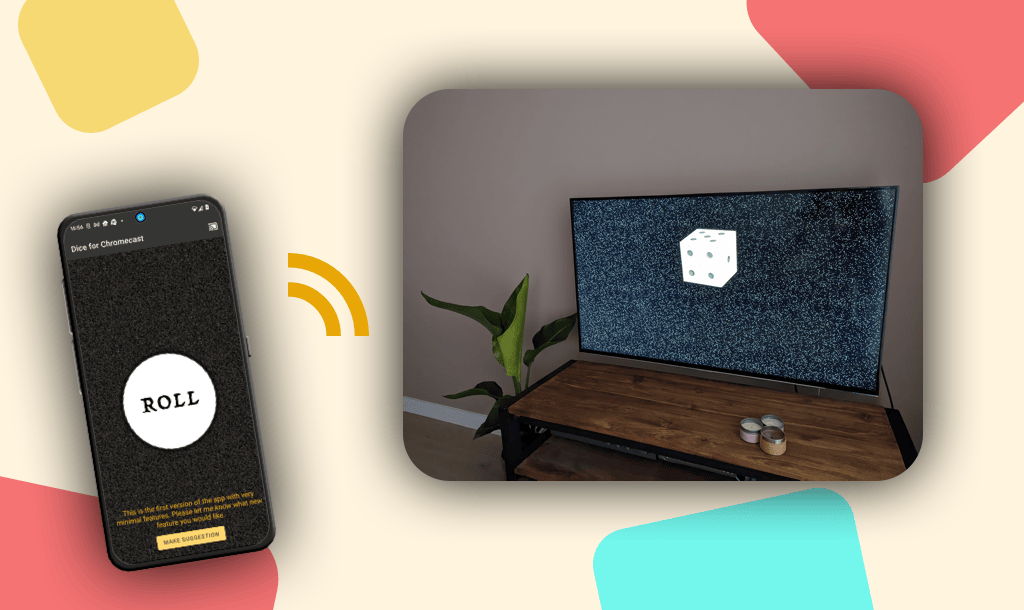
With Dice Together, the free dice roller app for Android, you roll on your phone and the dice appear life-size on your TV. Your phone is the remote and the TV is the game table, so everyone around it watches the roll.
You already have the app. Open it on your phone and tap the cast icon to put the dice on your TV.
Get Dice Together free from Google Play. The app works on any phone or tablet running Android 5.0 or newer.
Tap the cast icon in the top right of the app and pick your Chromecast, Google TV, or Android TV. Within a few seconds the dice are on the big screen.
Press the roll button on your phone and the dice tumble life-size across the TV screen, rolling sound included. The pencil button lets you set up one to twelve dice, each with its own type and color.
Tip: pass the phone to whoever's turn it is. The TV stays connected, so whoever holds the phone rolls.
From the single die of Trouble to the two of Parcheesi, five for Yahtzee, and twelve when your own game calls for a handful.
Besides the ordinary d6, the pencil button gives you the d2, d3, d4, d8, d10, d12, d20, the percentile tens die, and Fudge dice. Every die gets its own type and its own color, so three white d6 and one purple d20 can land in the same roll. What each die is for.
Pick a tabletop to match your evening, such as classic green felt, warm wood, or dark slate. The TV automatically matches your phone.
No Chromecast around? The app works just as well as a standalone dice roller on your phone or tablet.
Have an Android TV or Google TV? Install the app directly on the TV and roll with the remote. You don't need a phone at all.
Install it from Google Play on a Chromebook and it opens maximized in landscape instead of a narrow phone window. With a keyboard attached, the space bar rolls.
English, Spanish, German, French, and 26 more. The app automatically picks your phone's language.
There are no ads, no purchases, and no account. Install and roll.
All you need is the free app and a Wi-Fi network that both your phone and your TV are on.
See your TV in that list? Then you're one install away from dice on the big screen.
Install free from Google Play
Grab your Android phone
Scan the QR code and you'll land right on the free app in Google Play.
Or search Google Play for Dice Together.
Dice Together is Android-only. There's no iPhone version, but on your iPhone or iPad you can roll online at dice-together.com, no installation needed. You can even put the dice roller on your home screen like an app: open dice-together.com in Safari, tap the share button, and choose ‘Add to Home Screen’. From then on it opens full screen, with no address bar.
And if you have an Apple TV? Put your screen on the TV via AirPlay and you get the same effect: big dice the whole table can watch.
No. The app works fine without a TV, as a standalone dice roller on your phone or tablet. You only need a Chromecast, Google TV, or Android TV if you want to see the dice big on your TV.
Nothing. Dice Together is free, with no ads and no in-app purchases. You don't need an account either.
Any Android phone or tablet running Android 5.0 or newer, which is virtually every device. For casting, all you need is Wi-Fi: your phone and your TV have to be on the same network.
No. On an iPhone or iPad, use the online dice roller at dice-together.com. It runs right in the browser, no installation needed.
Yes. While casting, the TV is the screen everyone watches, and the roll that lands there is the one that counts. You control the dice from your phone, and the whole table watches.
The app doesn't ask for an account and doesn't build an advertising profile of you. We only measure anonymous usage statistics to improve the app. You'll find the full privacy policy at the bottom of this page.
Install Dice Together free from Google Play and put the dice on your TV tonight.
Install free from Google Play